Sports facility management software
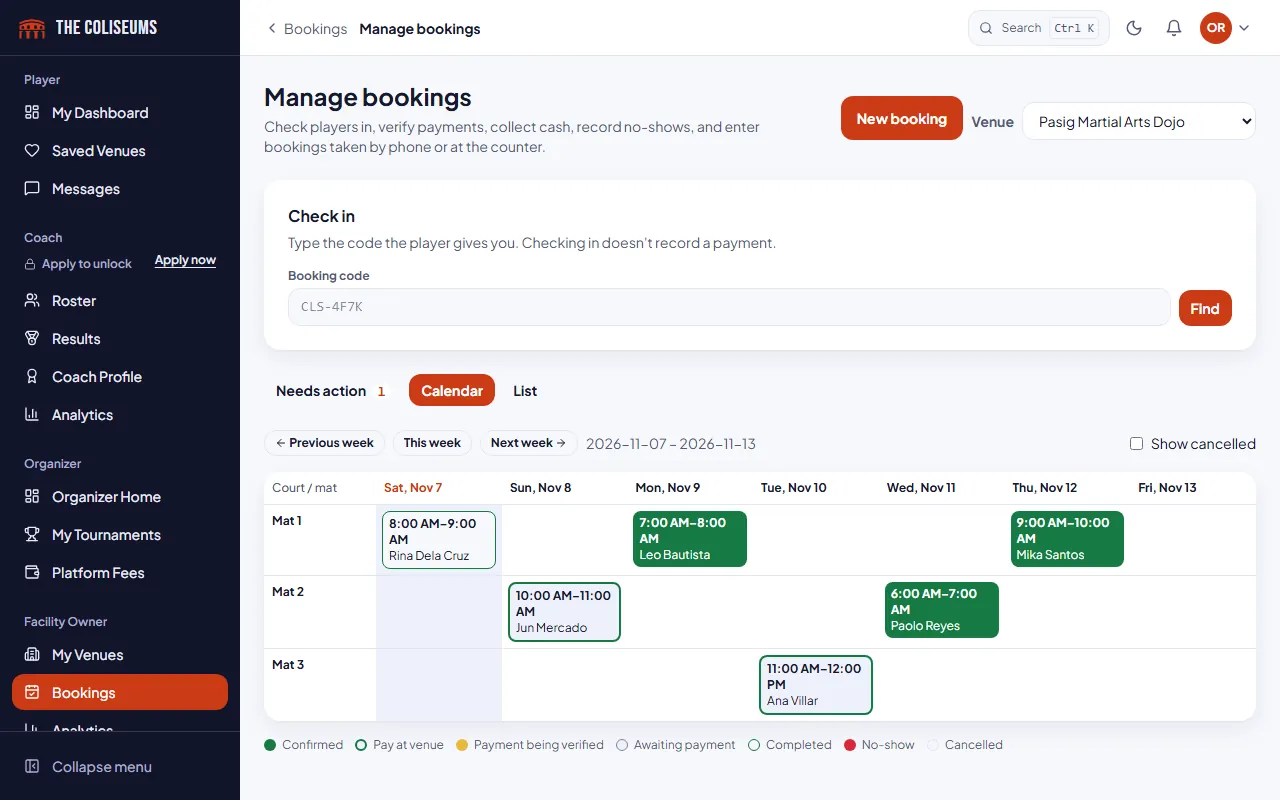
Our sports facility management software puts online, phone, Messenger and walk-in bookings on one front desk calendar. Double bookings are blocked, and receipts that need checking are flagged for you.
Free to list. No booking fees at launch.
Compared with a notebook and a group chat
- Bookings
- Notebook, spreadsheet and chatsOnline, phone and walk-in kept in different places
- On The ColiseumsAll of them on one calendar, per court, per week
- Double bookings
- Notebook, spreadsheet and chatsFound out when two groups arrive
- On The ColiseumsBlocked before they happen
- Payments
- Notebook, spreadsheet and chatsScroll the chat for a screenshot
- On The ColiseumsA Needs action list with each reference, and duplicates flagged
- Unpaid holds
- Notebook, spreadsheet and chatsCourts held for people who never pay
- On The ColiseumsReleased automatically when the time to pay runs out
- Staff
- Notebook, spreadsheet and chatsOne shared login, or none
- On The ColiseumsEach staff member invited with their own access
- Being found
- Notebook, spreadsheet and chatsWord of mouth and posts
- On The ColiseumsA venue page on Google, with photos, prices and hours
Front desk calendar for owners and staff
Staff add phone, Messenger and walk-in bookings to the same calendar that online bookings use, so every booking sits in one view.
- Phone, Messenger and walk-in bookings entered by staff
- Blocked time for maintenance or events
- Check-in by booking code
- In-app notifications and email for bookings
Hours, prices and booking rules
Opening hours, closures and pricing
Set opening hours for each venue, plus holiday closures and special hours. Use peak and off-peak pricing to charge different rates at different times. Leftover time under an hour is sold at a pro-rated price. A waitlist for full slots is Coming soon
Double bookings are blocked
The database blocks double bookings, so two people cannot hold the same court at the same time.
Cancellations and rescheduling
By default, players can cancel and reschedule up to 2 hours before the start, with one reschedule per booking. Owners can change both rules. The cancellation policy is shown before payment. Refunds are arranged directly between the player and the venue.
Payments, receipts and unpaid bookings
Players pay by QR or bank transfer and upload a receipt, or choose cash at the venue. Receipts waiting for review are flagged to you, and the platform detects duplicate payment references. No booking can hold a court indefinitely: unpaid bookings release automatically. The platform also tracks no-shows.
Receipts to review
Staff and security
Staff access without shared passwords
Apply as a Facility Owner from your dashboard. The Coliseums team approves each application, and you add your venue once you are approved. Approved owners can invite staff, such as a manager or front desk, without sharing a password. One account can hold several roles, shown as sections in one dashboard sidebar.
Security for payment details
Anyone who controls a payment QR code is prompted to turn on two-factor sign-in. The platform logs and sends alerts whenever a payment QR code or payment detail changes. Logins lock after repeated failures, and daily backups go to separate storage.
Hosting an event at your venue? See tournament software.
Reviews and your venue page
Your venue has its own page in the directory with photos, hours, amenities and a Covered badge. Only players with a completed booking or registration can review it. You can reply to reviews, edit or delete your replies, and report a review. See how a free venue listing works.
Sample Sports Center
Open 6:00 AM to 10:00 PM
Questions
What is sports facility management software?
It is a tool a venue uses to run bookings, payments, staff and opening hours from one place. On The Coliseums it includes a front desk calendar, payment receipts, staff invites and a venue page.
Can I take phone and walk-in bookings?
Yes. Staff add phone, Messenger and walk-in bookings to the same calendar that online bookings use.
Can I block courts for maintenance?
Yes. Staff can block time for maintenance or events, and you can set holiday closures and special hours.
How are double bookings prevented?
The database blocks double bookings, so two people cannot hold the same court at the same time.
Can my staff use it without my password?
Yes. Approved owners invite staff, such as a manager or front desk, without sharing passwords.
How do I get started?
Create an account, then apply as a Facility Owner from your dashboard. You can add your venue once The Coliseums team approves the application.
How do I check players in?
Each booking has a short code. Type it at the desk to find the booking and check the player in. Checking in doesn’t record a payment, so cash and receipts stay separate.
How do I confirm GCash or bank payments?
Players enter the reference number and a screenshot. The booking shows under Needs action until staff approve it, and a reference used twice is flagged.
Can I set different prices for evenings and weekends?
Yes. Each court has a base price per hour, with peak and off-peak rules on top. The price is locked on each booking when it is made.
What happens to bookings nobody pays for?
They release automatically when the time to pay runs out, so the court goes back on sale.
Can I manage more than one venue?
Yes. One owner account can hold several venues, and the front desk switches between them.
What about no-shows?
Staff mark a no-show at the desk. Players with repeated no-shows can only pay ahead by QR or bank, not in cash at the venue.
Put your front desk on one calendar
Create an account and apply as a Facility Owner. Once you are approved, add your venue, its courts and your prices.
What it costs
Listing a venue is free. Fees on bookings are built into the platform and are not charged at launch. Bookings entered by venue staff carry no platform fee by default.