Online court booking in the Philippines
Online court booking takes a minute: see the price, the hours and whether a court is covered, then book it. Venues get every booking on one calendar, without a Messenger thread or a phone call.
No booking fees at launch. Pay by GCash, Maya, bank transfer or cash.
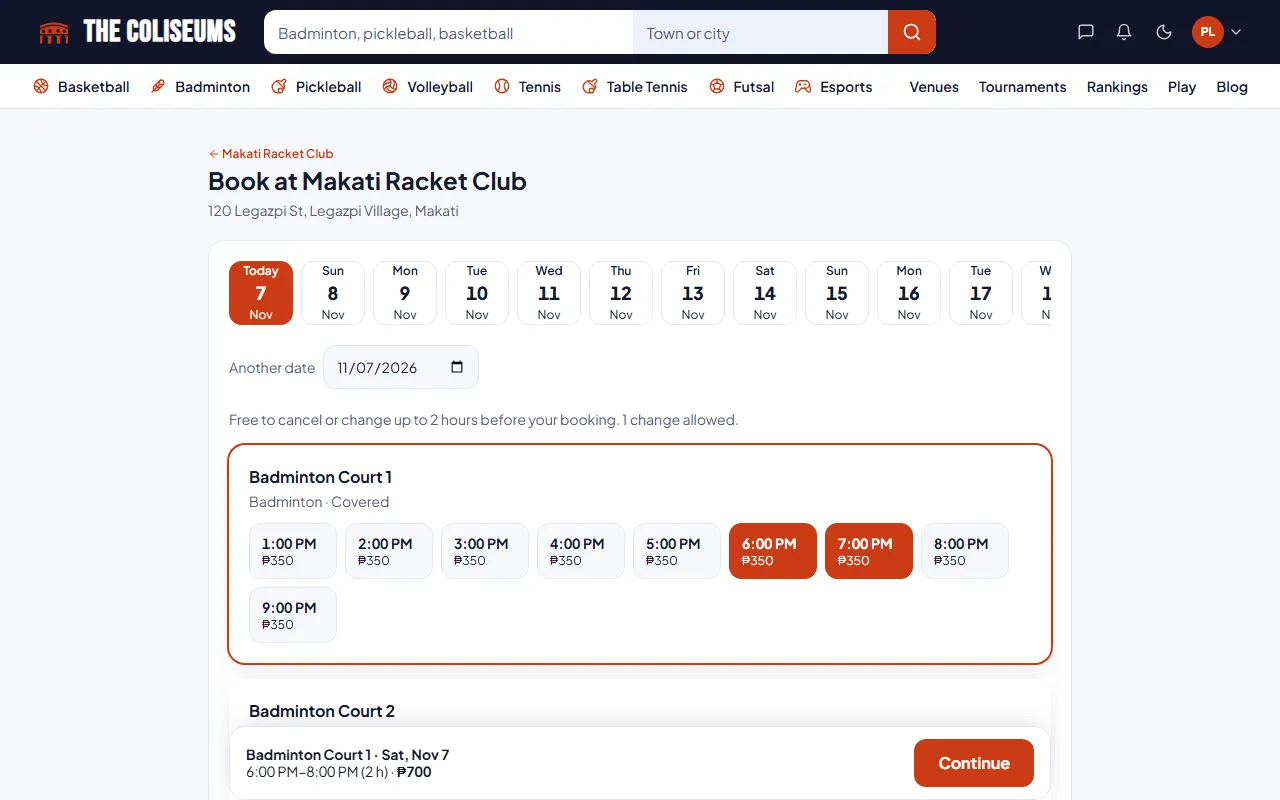
How online court booking works
- Find a venue in the directory and pick a court.
- Choose a time. Leftover time under an hour is sold at a pro-rated price, so 20 minutes costs a third of the hourly rate.
- Read the cancellation policy, which is shown before payment.
- Pay by QR or bank transfer and upload the receipt, or choose cash at the venue.
- Receive a confirmation, then reminders 24 hours and 2 hours before the start, by email and in the app.
Sample Court A
Covered₱300 an hour
PayEvery sport, in one booking flow
Badminton, pickleball, basketball, tennis, table tennis, volleyball and football courts are booked the same way, and so are mats for martial arts. Each court, mat or table is its own row with its own hours and prices, so a venue with four badminton courts and two pickleball courts shows six choices side by side. Browse courts by sport and city, from Makati, Pasig, Taguig and Quezon City to Cebu, Davao and the rest of the country, as venues list.
- Only hours you can still book are shown, so you never pick a time that has passed
- Today full? The page moves to the first day with a free hour
- Times are always the venue’s own clock, even if your phone is set to another country
- Prices show per hour before you choose, in pesos or the venue’s currency
Compared with booking by chat or phone
- Seeing what’s free
- Messenger, texts and callsAsk, wait for a reply, then ask again for another time
- On The ColiseumsEvery free hour on every court, on one screen
- Price
- Messenger, texts and callsQuoted in the chat, sometimes different on the day
- On The ColiseumsShown per hour before you choose, and locked on the booking
- Paying
- Messenger, texts and callsSend a GCash screenshot and hope it is seen
- On The ColiseumsQR or bank transfer with the reference number, or cash at the desk
- Double bookings
- Messenger, texts and callsTwo groups can be promised the same hour
- On The ColiseumsBlocked: two bookings can never hold the same court at once
- Changing plans
- Messenger, texts and callsMessage the owner and wait
- On The ColiseumsCancel or move it yourself within the venue’s policy
- Reminders
- Messenger, texts and callsNone
- On The ColiseumsEmail and app reminders 24 hours and 2 hours before
Run your venue's bookings
- A front desk calendar for owners and staff
- Phone, Messenger and walk-in bookings entered by staff
- Blocked time for maintenance or events
- Check-in by booking code
- Holiday closures and special hours
- Peak and off-peak pricing
- A waitlist for full slots Coming soon
- Staff invites for managers and front desk, without sharing passwords
It starts with a free venue listing.
Good to know before you book
Changes and cancellations
By default, you can cancel or reschedule up to 2 hours before the start time, and each booking can be rescheduled once. A venue can set its own policy, and it is shown before you pay. Refunds are arranged directly between the player and the venue.
Booking for your child
Book a court for your child from your own account, the same way as for yourself. A child needs their own profile only for tournaments, where age divisions apply and a parent or guardian gives consent for anyone under 18.
Double bookings and unpaid bookings
The database blocks double bookings, so two people cannot hold the same court at the same time. No booking can hold a court indefinitely: unpaid bookings release automatically, and receipts waiting for review are flagged to the owner. The platform also tracks no-shows.
Running an event instead? See tournament software.
Pickleball games
Once a pickleball game is full and everyone accepts, a lobby opens. Players pick a court and time from real availability, and the host books it. Each player's share of the court fee is shown, and players settle with the host directly. See pickleball open play.
Questions
How do I pay for a court I book online?
Pay by QR or bank transfer and upload the receipt, or choose cash at the venue.
Can I book less than an hour?
Yes. Leftover time under an hour is pro-rated, so 20 minutes costs a third of the hourly rate.
Can I cancel a booking?
Yes. By default you can cancel up to 2 hours before the start and reschedule once. A venue can set its own policy, and it is shown before you pay.
What happens if I do not pay?
Unpaid bookings release automatically, so the court goes back on sale.
Can a venue take phone or walk-in bookings?
Yes. Staff add phone, Messenger and walk-in bookings to the same calendar that online bookings use.
How do I book a badminton court in Manila?
Open the venue directory, filter by badminton and your city, open a venue and press Book a court. Pick a date, tap the hours you want on a court, then choose how to pay and reserve. The same steps work for pickleball, basketball, tennis, table tennis, volleyball and football.
Can I book several hours in a row?
Yes. Tap each hour on the same court. The total updates as you go, and the booking holds the whole block.
Do I need an account to book?
Yes. A free account with a verified email keeps your bookings, receipts and reminders in one place, and lets the venue know who booked.
Can I see whether a court is covered or has lights?
Yes. Each court shows whether it is covered, indoor or outdoor, and whether it has lights for night play. The directory has a Covered only filter.
How do I know the booking went through?
You get a booking page with a code you show at the desk, an email, and reminders 24 hours and 2 hours before you play. A QR or bank payment shows as confirmed once the venue checks your receipt.
Can I book a court for my child?
Yes. Book the court from your account as usual. Children only need their own profile for tournaments, where age divisions and a guardian’s consent apply.
Is booking on The Coliseums more expensive than booking directly?
No. You pay the venue’s own price, and no booking fee is added at launch.
Your next game is a minute away
Find a court near you and book it now, or put your own courts online and take bookings at any hour.
What it costs
Listing a venue is free. Fees on bookings are not charged at launch.